Record the things that matter to your business on every contact, filter by them, and go through the result one call at a time.
Most CRMs make you choose between a fixed set of fields and a "custom object" builder that takes an afternoon. Sheetsmith CRM sits between: every contact has the basics, plus up to five extra fields you name yourself, and a screen that turns any filter into a call list.
Tags are the words you sort people by: client, christmas, referrer, pub, north. On a contact's page the Tags box shows them as chips. Start typing and every tag you have already used is offered, so the spelling stays the same across contacts; press Enter or pick one to add it, and the × on a chip removes it. The same box appears on each person in Work the list, so you can tag as you go through a list.
To tag a whole set of people at once, filter them in Work the list and press Tag everyone in this list. A photographer can filter not contacted for 10 months, tag them lapsed, and have that list ready every year.
Tags come in from a spreadsheet column called Tags (comma-separated) and go out the same way in the export.
Every contact has a Source: where they came from. Google, Referral, Website, Repeat customer, Social media, Directory, Walk-in, or anything you type. It is set when you add or edit a contact, comes in from a spreadsheet column called Source, and is shown as "via Referral" on the contact's page. Contacts created with the New enquiry button are marked "Enquiry". Over a year, sorting by source tells you which channels are worth your time.
In Settings → Extra fields, name up to five things you want to record on every contact, in your own words: Turnover, Current supplier, Industry, Number of locations, Renewal month. Leave a box blank to hide that field. Once named, they appear:
They are free text on purpose. Dropdown lists and number types are the point at which a CRM starts needing an administrator; a consistent word in a text box does the same job for a small business.
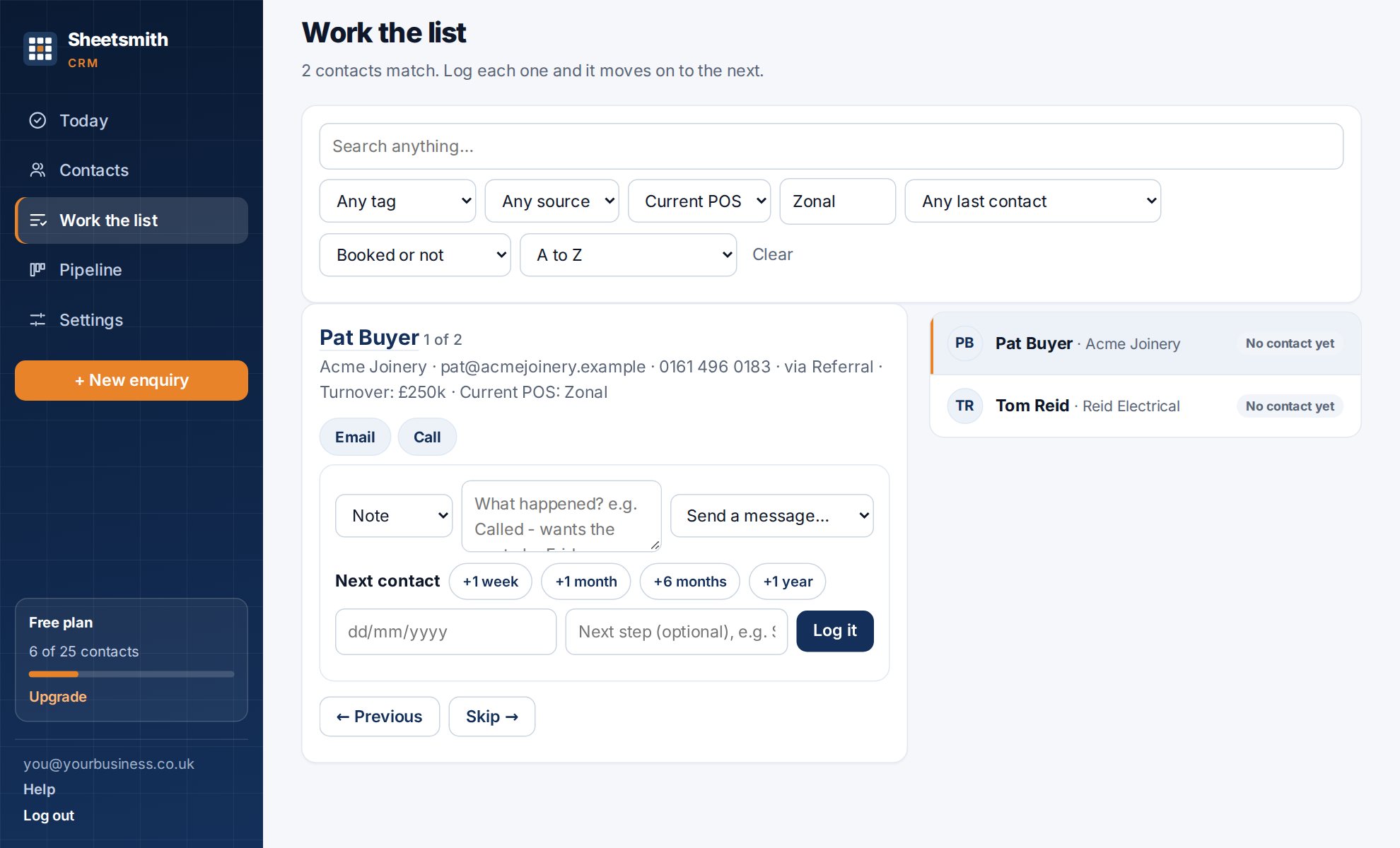
Work the list is the screen for going through a set of people, one after another, without leaving it. Pick any combination of:
The result is a queue on the right and the current person on the left, with their details, their last three notes, and the same Log it box as their page. Log the call, set the next date, and the screen moves on to the next person. Skip to move on without logging. Click the name to open their full page; "Back to the list" returns you to where you were.
Above the queue there are three buttons for the list as a whole:
A photographer who tags everyone who booked a Christmas shoot as christmas can, the following October, filter by that tag, copy the addresses, and write one email to all of them from her own account. That is the whole workflow, and it takes under a minute.
One point of law, not advice: emailing your own past customers about similar things you offer is generally allowed in the UK, provided you gave them a way to opt out when you took their details and you include one in every message (a line saying "reply STOP and I will take you off the list" is enough). Emailing people who have never bought from you needs their consent first.
Some lists that earn their keep:
On the Team plan, everyone sees the same lists. Two people can split a list by a tag ("north", "south") or by a letter range and work it in parallel.
Next: Deals and the pipeline
Read it Sheetsmith